Embroidery Machine vs Sewing Machine: The Difference
An embroidery machine and a sewing machine do different jobs: the embroidery machine stitches designs on fabric you already have, and the sewing machine joins fabric with seams, hems and quilting. The two rely on different parts, so a machine built for one usually can't do the other.
On this page (17 sections)
- What an embroidery machine does
- What a sewing machine does
- Head to head on jobs
- Head to head on stitches and designs
- Head to head on size and weight
- Head to head on setup help
- What comes in the box
- Design transfer and software
- Supplies each machine needs
- Projects each machine suits
- Common mistakes with each machine
- What a first project looks like
- Care and storage
- How the two compare on cost
- Questions to ask yourself first
- When a combo makes more sense
- Embroidery machine or sewing machine: which to pick
An embroidery machine stitches designs onto fabric you already have, and a sewing machine joins fabric with seams, hems and quilting. The two jobs rely on different parts, so a machine built for one usually can't do the other.
This page compares the Brother PE545, an embroidery-only machine, with the Brother CS7000X, a sewing and quilting machine, so you can see where each one fits.

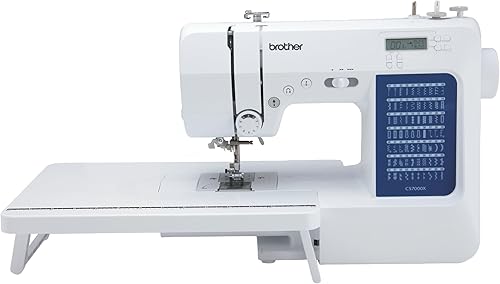 Best for sewing and quilting
Brother CS7000X sewing and quilting machine
| Product | Best for | Type | Weight | Built-in designs or stitches | Our score |
|---|---|---|---|---|---|
| Brother PE545 embroidery machine | designs on finished items | Embroidery only | 14.1 lb | 135 designs | 8.6 |
| Brother CS7000X sewing and quilting machine | sewing and quilting | Sewing and quilting only | 14 lb | 70 stitches | 8.3 |
We compared the specs of both machines side by side. Our score weighs specs, features and buyer feedback against what you're shopping for.
What an embroidery machine does
An embroidery machine moves a hoop under the needle and stitches a design that is built in or loaded from a file. The PE545 has 135 built-in designs, 10 frame patterns and 10 fonts, with 7 English and 3 Japanese lettering fonts.
Embroidery machine designs must fit the hoop
The PE545 has a 4 x 4 in embroidery field, so each design has to fit inside that area. Anything larger needs a machine with a bigger field, such as the 5 x 7 in Brother PE900.
The 3.7 in touchscreen lets you drag a design into place and preview it before you stitch.
What a sewing machine does
A sewing machine joins fabric with seams, hems and decorative stitches. The CS7000X has 70 built-in stitches for utility, decorative, heirloom and quilting work.
Seams, hems and buttonholes
The CS7000X has seven one-step auto-size buttonholes and an automatic needle threader. It also comes with 10 sewing feet and a quilt guide, so you can change the foot for each job.
Room for quilts
Brother says the CS7000X has a larger needle-to-arm workspace for bigger projects such as quilts. It also has a detachable wide table, which supports larger quilting work.
Head to head on jobs
Each machine handles a different set of jobs, and only a combo covers both.
| Job | Brother PE545 | Brother CS7000X |
|---|---|---|
| Monogram or design on a finished item | Yes | No |
| Seams and hems | No | Yes |
| Buttonholes | No | Yes, 7 one-step styles |
| Quilting | No | Yes, with a quilt guide and wide table |
| Designs loaded from a computer | Yes | No |
The PE545 does not work as a traditional sewing machine, so it can't make a seam, a hem or a zipper. The CS7000X covers seams, hems and buttonholes with 70 stitches, 7 one-step buttonholes and 10 feet.
Head to head on stitches and designs
The CS7000X offers 70 sewing stitches, and the PE545 offers 135 embroidery designs, so the two produce different kinds of output. A sewing stitch repeats along a seam, while an embroidery design is a file that tells the hoop where to move for every stitch.
The PE545 adds 10 frame patterns and 10 lettering fonts, which suits monograms and framed designs.
Head to head on size and weight
The two machines weigh about the same, at 14.1 lb for the PE545 and 14 lb for the CS7000X, but their shapes are very different.
The PE545 is 16.5 in deep and 7.76 in wide, while the CS7000X is 7 in deep and 17 in wide. Both are about 12 in tall, so measure your table depth and width, since the CS7000X needs more side-to-side room.
Keep your fingers clear of the needle while either machine runs, and unplug it before you change a needle.
Head to head on setup help
Both machines have features that help a first-timer, but they help with different jobs.
The PE545 has an easy needle threading system and built-in tutorial videos on its screen. It also shows your design in color before you stitch, so you can check the placement.
The CS7000X has an automatic needle threader and a drop-in top bobbin that Brother calls jam resistant. It also has an LCD display.
What comes in the box
The PE545 comes with a 4 x 4 in hoop, an accessory pouch and three pre-wound bobbins, while the CS7000X comes with 10 sewing feet, a quilt guide and a wide table.
Brother says the PE545 pouch holds needles, spool caps, a seam ripper and scissors. The three pre-wound bobbins hold 90 weight white embroidery bobbin thread, so you can start a first design without winding a bobbin.
The CS7000X also comes with a protective hard case and a trilingual English, Spanish and French manual. Brother says the hard case helps with portability and class use.
Brother lists a 25-year limited warranty and technical support for the life of the product on both machines. Warranty terms vary by part, so read them on the Brother site before you buy.
Design transfer and software
The PE545 takes designs from a PC over wireless LAN or from a USB port, while the CS7000X is a sewing machine that doesn't use design files.
Brother's free Design Database Transfer software sends files from a PC to the PE545 over wireless LAN, with no USB cable needed. Brother also says its Artspira app lets you draw patterns on a mobile device or download them and send them to the PE545 wirelessly.
The PE545 also has a USB port and a memory function that lets you import designs from a USB memory stick. Brother notes that wireless compatibility may vary by device and operating system.
Supplies each machine needs
Embroidery needs stabilizer and embroidery thread, while sewing needs sewing thread and a basic set of feet and needles.
Stabilizer is the backing that keeps the fabric steady in the hoop, and most embroidery projects need one. The do you need stabilizer for embroidery post covers the basics before you buy a roll.
Towels and knits need their own stabilizer choices, and the best stabilizer for knits, towels and hats guide matches each fabric to a type.
Embroidery thread vs sewing thread explains why the two threads can't always swap.
Embroidery needles and sewing needles also differ, so check the needle package before you start a project. The embroidery machine needles post explains the sizes.
Projects each machine suits
The PE545 suits designs added to finished items, and the CS7000X suits projects built from fabric, such as clothes, bags and quilts.
The PE545 is a good match for monograms and designs on clothes, pillows and blankets you already own. The CS7000X handles the construction work, including seams, hems, buttonholes and quilting.
You can use both machines on one project: sew the bag or the quilt on the sewing machine, then add a monogram or a design on the embroidery machine.
Common mistakes with each machine
The usual embroidery mistakes are picking a design larger than the field and skipping the stabilizer. Either one can shift the design or pucker the fabric.
The usual sewing mistakes are using the wrong needle for the fabric and sewing a seam without a test. A test seam on scrap shows the stitch length and tension before you commit to the real piece.
What a first project looks like
A first project on either machine goes best with a test on scrap fabric before the real piece.
First embroidery project on the PE545
- Pick a small design that fits the 4 x 4 in field, such as a monogram.
- Hoop the fabric with stabilizer, and keep both flat and tight.
- Choose the design on the touchscreen and drag it into place.
- Stitch a test on scrap, then stitch the real piece.
First sewing project on the CS7000X
- Pick a stitch and fit the matching foot.
- Sew a test seam on a scrap of the same fabric.
- Sew the real seam once the test looks right.
Care and storage
Both machines need the lint cleaned from the bobbin area and the needle changed when it's dull or bent.
The PE545 comes with a cleaning brush and a dust cover, and the CS7000X comes with a hard case for storage and carrying. Cover or case the machine between sessions to keep dust out of the moving parts.
How the two compare on cost
The CS7000X is the budget pick of this pair, and the PE545 is mid-range, because the PE545 adds an embroidery unit and the CS7000X adds sewing and quilting features. Supplies add to either choice, so plan for stabilizer, thread and needles before you buy the machine.
Prices change, so compare both when you shop. For budget picks across the beginner range, the budget beginner embroidery machines guide is the place to start.
Questions to ask yourself first
Four questions usually point to the right machine. Answer them before you read the verdict below.
- Do you sew clothes, bags or quilts most of the time? If yes, the CS7000X covers that work.
- Do you want designs on items you already have? If yes, the PE545 is built for that job.
- Do you want both on one machine? If yes, look at a combo, which covers both jobs.
- How much table width do you have? Measure it before you choose the CS7000X, since it is 17 in wide.
When a combo makes more sense
A combo makes more sense when you want both jobs on one machine and have room for only one. It covers sewing and embroidery in one body, so you don't need a second machine on the table.
The Brother SE700 review covers a combo with a 4 x 4 in embroidery field and 103 built-in sewing stitches. It has the same 16.5 x 7.76 in footprint as the PE545 and weighs 15.6 lb.
Set side by side, the PE545 and CS7000X weigh 28.1 lb together and need about 25 in of table width. The Brother SE2000 offers a 5 x 7 in field and 241 sewing stitches for a larger setup, but it weighs 38 lb.
The best sewing and embroidery combo machines guide compares more options. The embroider with a regular sewing machine post explains what a plain machine can and can't do with embroidery.
Embroidery machine or sewing machine: which to pick
Pick the Brother PE545 if you want to add designs to finished items, and pick the Brother CS7000X if you mostly sew seams, hems and quilts.
- Pick the PE545 if you want designs on clothes, pillows or blankets you already have, and you don't need to sew.
- Pick the CS7000X if you sew seams, hems and quilts most of the time, and you don't need embroidery designs.
- Pick a combo if you want both jobs, and compare the SE700 first.
If budget is the main limit, the budget beginner embroidery machines guide lists the picks. For the full set of machine types, start with the Embroidery Machines for Beginners guide.
Frequently asked questions
Can a sewing machine embroider?
No, a sewing machine such as the Brother CS7000X is sold for sewing and quilting, so it does not stitch embroidery designs from a file. A sewing and embroidery combo can do both jobs, so look for one if you want designs as well as seams.
Can an embroidery machine sew a seam?
No, the Brother PE545 is embroidery only and does not function as a traditional sewing machine, so it can't make seams, hems or zippers. You would need a sewing machine or a combo for that work, and a combo keeps both jobs on one table.
Which should a beginner buy first, an embroidery machine or a sewing machine?
Buy the one that matches your main work: a sewing machine for clothes, bags and quilts, or an embroidery machine for adding designs to items you already own. A combo covers both jobs in one machine if you have room for only one.
Is a combo better than two separate machines?
A combo saves desk space and puts both jobs in one body, but you can only run one function at a time. Two separate machines let each one stay set up for its own job, so choose by how much space you have and how often you switch tasks.


