Best Beginner Embroidery Machines Under $1,000
The best beginner embroidery machines include the Brother SE700 sewing and embroidery machine for a first machine that also sews, the Brother PE545 embroidery machine for embroidery only with wireless transfer, and the Poolin EOC05 embroidery machine for long designs on a 4 x 9.25 in hoop.
On this page (10 sections)
- How we picked the best beginner embroidery machines
- The best beginner embroidery machines in detail
- Embroidery only or sewing and embroidery for a first machine
- What hoop size a first machine needs
- Screens, Wi-Fi and software for a first machine
- How much a first machine weighs
- Help and learning curve for a first machine
- What else you need besides the machine
- Brother or Poolin for a first machine
- Which of the best beginner embroidery machines to buy
The best beginner embroidery machines have a hoop that fits your first projects, a screen you can read and a setup you can finish in an afternoon.
This guide compares seven machines at this budget, and the first choice is embroidery only or a combo that also sews. If your first projects are names on towels, monograms on shirts or small gifts, most of them will do the job.
New to all of this? Start with embroidery machines for beginners for the basics, then come back to compare models.
Our picks at a glance
-
1
 Best for a first machine that also sews
Brother SE700 sewing and embroidery machine
9.2/10 our score
See it on Amazon -
2
 Best for embroidery only with wireless transfer
Brother PE545 embroidery machine
8.9/10 our score
See it on Amazon -
3
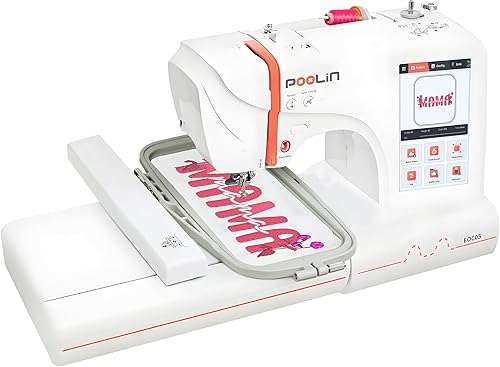 Best for long designs on a 4 x 9.25 in hoop
Poolin EOC05 embroidery machine
8.7/10 our score
See it on Amazon
- 4
 Check it
Janome Memory Craft 1000 combo
Best for a compact combo with 300 stitches - 5
 Check it
Brother PE535 embroidery machine
Best for a simple, budget first machine - 6
 Check it
Singer SE9180 sewing and embroidery machine
Best for a 7-inch screen and fast sewing - 7
 Check it
Poolin EOC03 embroidery machine
Best for a learner who wants video lessons
How we picked the best beginner embroidery machines
We compared hoop size, machine type, screen size, weight and what comes in the box, then checked each machine against what a first-time owner needs. Our score weighs specs, features and buyer feedback against what you're shopping for.
We start with the budget tier: the Brother PE535, the Brother PE545, the Brother SE700 and the Poolin EOC03. The mid-range tier holds the Poolin EOC05, the Singer SE9180 and the Janome Memory Craft 1000, which sits near the top of the budget.
Buyer feedback counted as one signal. The Singer SE9180 has a long spec sheet, but owner feedback on it is more mixed than on the Brother and Poolin EOC05 picks, so it sits lower in the list.
A higher tier isn't automatically the better buy. For a first machine, hoop size, screen and whether you need sewing matter more than price.
Embroidery-only machines do one job, and combos add sewing for hems, mends and buttonholes. We picked a mix of both, so you can decide on the type first and the brand second.
| Product | Best for | Hoop area | Type | Weight | Our score |
|---|---|---|---|---|---|
| Brother SE700 sewing and embroidery machine | a first machine that also sews | 4 x 4 in | Sewing and embroidery | 15.6 lb | 9.2 |
| Brother PE545 embroidery machine | embroidery only with wireless transfer | 4 x 4 in | Embroidery only | 14.1 lb | 8.9 |
| Poolin EOC05 embroidery machine | long designs on a 4 x 9.25 in hoop | 4 x 9.25 in | Embroidery only | 22 lb | 8.7 |
| Janome Memory Craft 1000 combo | a compact combo with 300 stitches | 5.5 x 5.5 in | Sewing and embroidery | 22 lb | 8.5 |
| Brother PE535 embroidery machine | a simple, budget first machine | 4 x 4 in | Embroidery only | 15 lb | 8.3 |
| Singer SE9180 sewing and embroidery machine | a 7-inch screen and fast sewing | 170 x 100 mm | Sewing and embroidery | 15.5 lb | 8.1 |
| Poolin EOC03 embroidery machine | a learner who wants video lessons | 4 x 4 and 4 x 9.25 in | Embroidery only | 15 lb | 7.8 |
The best beginner embroidery machines in detail
The Brother SE700 ranks first because it sews and embroiders on one machine, and its 4 x 4 in hoop fits most first projects. The Brother PE545 and the Poolin EOC05 follow for buyers who only want embroidery.
Brother SE700 sewing and embroidery machine
- 4 x 4 in embroidery field
- 135 built-in designs
- 103 built-in sewing stitches
- Automatic needle threader
- Wireless design transfer
A combo with a 4 x 4 in field and 135 built-in designs suits a beginner who wants sewing and embroidery in one machine.
Pros
- Sews and embroiders on one machine
- Automatic needle threader and thread cutter
- Eight sewing feet included
Cons
- Designs larger than 4 x 4 in won't fit in one hooping
The Brother SE700 is the best first pick because it sews and embroiders on one machine. It has a 4 x 4 in embroidery field, 135 built-in designs and 10 lettering fonts.
A 3.7 inch color touchscreen lets you preview a design and edit it before you stitch. Wireless transfer works through Brother's Design Database Transfer software, or you can use the built-in USB port.
On the sewing side you get 103 stitches, 10 one-step buttonholes, an automatic needle threader and 8 included feet. Brother says it sews at up to 710 stitches per minute.
It suits someone who wants hems and repairs plus names and small gifts from one machine. The drawback is the 4 x 4 in field, since designs larger than that won't fit in one hooping.
Brother PE545 embroidery machine
- 4 x 4 in embroidery field
- 3.7 inch color touchscreen
- 135 built-in designs
- 10 built-in fonts
- Wireless LAN and USB port
Embroidery only with 135 built-in designs and wireless transfer suits a beginner who doesn't need to sew.
Pros
- Wireless design transfer from a computer or app
- Drag and drop placement on the screen
- 25-year limited warranty from Brother
Cons
- It can't sew, so hems and repairs need a separate machine
The Brother PE545 is the pick if you want embroidery only, with wireless transfer. It has a 4 x 4 in embroidery field, 135 built-in designs and 10 fonts, 7 English and 3 Japanese.
On the 3.7 inch color touchscreen you can drag a design into place, edit it and preview it before stitching. Built-in tutorial videos play on the same screen.
You can send designs from a computer over wireless LAN or from Brother's Artspira app, and a USB port takes your own files. An accessory pouch in the box holds needles, pre-wound bobbins, scissors and a seam ripper.
It suits a first-timer who wants to decorate shirts, towels and pillows and doesn't need to sew. Brother backs it with a 25-year limited warranty and says technical support lasts for the life of the product.
The drawback is that it can't sew, so hems, mends and repairs need a separate sewing machine.
Poolin EOC05 embroidery machine
- 4 x 9.25 in embroidery area
- 7-inch color touchscreen
- Wi-Fi and USB design transfer
- Two hoops included
- Institch software
A 4 x 9.25 in area and a 7-inch screen make this the embroidery-only pick for long names and lettering.
Pros
- Long embroidery area for lettering
- Two hoops and a starter set in the box
- Free design software that works with Mac and iPad
Cons
- At 22 lb it's the heaviest embroidery-only machine here
The Poolin EOC05 is the embroidery-only pick for longer designs. Poolin says its 4 x 9.25 in area suits shirts, hoodies, bags and gifts.
It comes with two hoops, 4 x 9.25 in and 4 x 4 in, so small designs don't need the long hoop. The 7-inch color touchscreen runs Institch OS2, and you can send patterns by Wi-Fi or USB.
The box holds a starter set: 6 spools of thread, 25 bobbins, 30 pieces of stabilizer and 9 needles. Poolin says the free design software works with Mac and iPad.
Poolin says the machine is for personal projects, not commercial mass production. It suits someone who wants names, lettering and gifts at home, and our Poolin EOC05 review covers setup and use in more detail.
The drawback is weight: at 22 lb it's the heaviest embroidery-only machine in this roundup.
Janome Memory Craft 1000 combo
- 300 built-in stitches
- 241 built-in designs
- 3.5 inch color touchscreen
- 5.5 x 5.5 in hoop
- Optical bobbin thread monitoring
300 built-in stitches in a compact body suit a sewer who wants a wide stitch choice without a large footprint.
Pros
- Most built-in stitches in this roundup
- Auto presets load the recommended stitch settings and presser foot
- Hoop is larger than a 4 x 4 in field
Cons
- The 3.5 inch screen is one of the smallest here
The Janome Memory Craft 1000 is the combo to pick if you want a wide stitch choice in a compact machine. It has 300 built-in stitches, 241 built-in embroidery designs and a 3.5 inch color touchscreen.
Its square hoop is 5.5 x 5.5 in, which is more room than the 4 x 4 in field on the Brother SE700. A two-stage lever lets you center the fabric before you lock the hoop.
Auto presets load the recommended settings and presser foot for the stitch you choose. Janome says the embroidery arm mounts at the back, which keeps the desktop footprint small.
Optical bobbin thread monitoring warns you before the bobbin runs out, and automatic thread cutting trims both threads with one touch. It suits a sewer who wants both jobs without much desk space.
The drawback is the screen: at 3.5 inches it's one of the smallest here, which makes small edits harder to see.
Brother PE535 embroidery machine
- 4 x 4 in embroidery field
- 80 built-in designs
- 9 built-in fonts
- 3.2 inch color touchscreen
- USB port for your own designs
A simple embroidery machine with 80 built-in designs suits a first-timer who wants fewer features to learn.
Pros
- Drag and drop design placement on the screen
- 25-year limited warranty from Brother
- Instructional DVD and bilingual manual
Cons
- Fewer built-in designs and a smaller screen than most of the other picks
The Brother PE535 is the simplest machine here, and it suits a first-timer who wants to keep things basic. It has a 4 x 4 in embroidery field, 80 built-in designs and 9 built-in fonts.
The 3.2 inch color touchscreen lets you preview a design before you stitch, and drag and drop moves it into place. A USB port saves your own designs to the machine's built-in memory.
The box has a 4 x 4 in hoop, an embroidery arm, an embroidery foot, an instructional DVD and a bilingual manual. Brother backs it with a 25-year limited warranty and free phone support for the life of the machine.
It suits someone who wants to decorate a few items at home and is happy with USB transfer. The drawback is a smaller screen and fewer built-in designs than most of the other picks.
Singer SE9180 sewing and embroidery machine
- 7-inch color touchscreen
- 250 sewing stitches
- 150 embroidery designs
- mySewnet Wi-Fi with app alerts
- Automatic needle threader
A 7-inch screen and 250 sewing stitches suit someone who sews often and wants embroidery in the same machine.
Pros
- Large 7-inch color touchscreen
- Sews up to 800 stitches per minute, Singer says
- Wi-Fi transfer with app progress alerts
Cons
- The top sewing speed is fast for a new sewer
The Singer SE9180 is the pick for a big touchscreen and quick sewing. It has a 7-inch color touchscreen, 250 sewing stitches, 150 embroidery designs and 10 fonts.
Singer says it sews up to 800 stitches per minute and embroiders up to 450. A speed slider and a start/stop button let you sew without a foot pedal.
The mySewnet Wi-Fi connection sends designs to the machine and gives you progress alerts in the app. The 170 x 100 mm hoop is about 6.7 x 3.9 in, wider than a 4 x 4 in field but a little shorter.
It suits someone who sews often and wants embroidery in the same machine. The drawback is speed: the top setting is fast for a new sewer, so keep the slider low until you're comfortable.
Poolin EOC03 embroidery machine
- 4 x 4 and 4 x 9.25 in areas
- 130 built-in designs
- 8 lettering fonts
- Wi-Fi design transfer
- Starter kit with 20 stabilizers
A starter kit and video lessons help a first-time buyer begin without shopping for supplies first.
Pros
- Starter kit with stabilizers, bobbins and thread
- YouTube lessons and one-on-one help from Poolin
- Two embroidery sizes
Cons
- It doesn't sew, so hems and mends need another machine
The Poolin EOC03 is an embroidery-only machine for a first-timer who wants help while learning. It has two embroidery sizes, 4 x 4 in and 4 x 9.25 in, plus 130 built-in designs and 8 lettering fonts.
Poolin says its Institch system keeps the controls simple, and Wi-Fi transfer plus free software let you send your own patterns to the machine. The box includes 20 embroidery stabilizers, 25 prewound bobbins, 6 spools of thread and a tool kit.
Poolin says YouTube tutorials, a community of more than 12,000 users and free one-on-one online help from engineers come with the machine.
It suits a first-time buyer who learns best from video lessons and wants basic supplies in the box. The drawback is that it doesn't sew, so hems, mends and buttonholes need another machine.
Embroidery only or sewing and embroidery for a first machine
An embroidery-only machine does one job, and a sewing and embroidery combo also handles hems, mends and buttonholes. Three of the seven sew as well as embroider: the Brother SE700, the Singer SE9180 and the Janome Memory Craft 1000.
The other four are embroidery only, so you'd still need a sewing machine for seams and repairs. Embroidery machine vs sewing machine explains the difference in plain terms.
Beginner embroidery machines that also sew
If you already own a sewing machine, an embroidery-only pick like the Brother PE545 or the Poolin EOC03 may be all you need. A combo makes more sense when you want one machine for both jobs, and our Brother SE700 review goes deeper on that model.
For a closer look at whether a regular machine can stitch designs, see can you embroider with a regular sewing machine.
What hoop size a first machine needs
Most first projects fit a 4 x 4 in hoop, such as a name on a towel or a small logo on a tote bag. The hoop sets how big one design can be in a single hooping.
A design larger than the hoop has to be split into parts, and you move the fabric in the hoop between them. Line the fabric up carefully each time, since a small shift shows in the finished stitching.
When a bigger hoop is worth the step up
A bigger hoop is worth it if you want long lettering or large designs in one hooping. It also means a bigger hoop to store, which matters in a small room.
The Poolin EOC05 and EOC03 both offer a 4 x 9.25 in area, the Singer SE9180 uses a 170 x 100 mm hoop (about 6.7 x 3.9 in), and the Janome uses a 5.5 x 5.5 in square.
For the full picture on sizes, read embroidery hoop sizes explained. If you want more room without sewing, the Brother PE900 review covers a 5 x 7 in embroidery-only machine.
If you're choosing between a 4 x 4 in combo and that machine, Brother SE700 vs PE900 compares them directly.
Screens, Wi-Fi and software for a first machine
The screen decides how easily you can edit a design, and the transfer method decides how designs reach the machine. Both matter because you'll check each design on the screen before it stitches.
Touchscreen size and what it changes
The Singer SE9180 and the Poolin EOC05 have 7-inch screens, while the Brother SE700 and PE545 have 3.7 inch screens. The Janome has a 3.5 inch screen, and the Brother PE535 has a 3.2 inch screen.
A larger screen is easier to read at arm's length, which helps if you'd rather not squint at small icons. Brightness and menu layout are hard to judge from specs, so try a machine in a store if one near you carries it.
Wi-Fi and design software
Each brand has its own software. Brother's wireless models use Design Database Transfer and the Artspira app, Poolin machines use Institch, and the Singer uses mySewnet.
The Brother PE535 relies on its USB port for your own designs.
How much a first machine weighs
Five of the seven machines weigh 14 to 16 lb, and only the Poolin EOC05 and the Janome reach 22 lb. The Brother PE545 is the lightest at 14.1 lb.
Weight matters if you'll carry the machine between a closet and a table. If it will stay on one desk, a heavier machine is less of a concern.
Help and learning curve for a first machine
The two Poolin machines come with video lessons, a user community and one-on-one help, and the Brother PE545 plays tutorial videos on its own screen. Brother also says the PE545 and PE535 come with technical support for the life of the product.
Keep your fingers clear of the needle while the machine runs, and unplug it before you change a needle.
Video lessons and one-on-one help
Poolin says YouTube lessons, a user community and one-on-one help from engineers come with its machines. You'll need an internet connection to watch the Poolin lessons, while the Brother PE545 has its lessons built into the machine.
Watch a few lessons before your first stitch, so you know where the controls sit.
Warranty and support
Brother gives the SE700 and the PE545 a 25-year limited warranty on the chassis casting, with 2 years on electronics and 1 year on parts and labor. The PE535 also has a 25-year limited warranty from Brother, and Brother's terms run from the original purchase date, so keep your receipt.
Janome gives the Memory Craft 1000 a 25-year limited warranty on mechanical parts, 2 years on electrical parts and 1 year on labor. We didn't find a warranty length for the Singer or the Poolin machines, so check with each maker before you buy, and see the Brother USA site for current Brother terms.
What else you need besides the machine
Only the two Poolin machines here include stabilizer in the box, so budget for it with the other five. Stabilizer backs the fabric while the machine stitches, and do you need stabilizer for embroidery explains when you need it.
Most boxes here include needles, and our embroidery machine needles guide explains when to change them. The Poolin boxes include six spools of thread, so plan on a bigger thread set too.
Brother or Poolin for a first machine
The three Brother machines here all use a 4 x 4 in field, and the two Poolin embroidery-only machines also offer a 4 x 9.25 in area. That's the main difference between the two brands in this roundup.
If you want a 4 x 4 in field with Brother's software and warranty, the three Brother picks fit. If you want a longer hoop with starter lessons, the two Poolin machines fit better.
Neither brand is the safer buy on its own, so compare hoop, screen and sewing needs first. Our Poolin vs Brother comparison lines up the EOC05 and the PE545 side by side.
Which of the best beginner embroidery machines to buy
For most first-time buyers the answer is the Brother SE700, and the other six fit narrower needs.
- Pick the Brother SE700 if you want one machine for hems and names, and a 4 x 4 in hoop covers your first projects.
- Pick the Brother PE545 if you only want embroidery and wireless transfer on a simple machine.
- Pick the Poolin EOC05 if long lettering on a 4 x 9.25 in hoop matters more than sewing.
- Pick the Janome Memory Craft 1000 if you want the most stitches in a compact combo and can live with a smaller screen.
- Pick the Brother PE535 if you want the simplest machine here and USB transfer is enough for you.
- Pick the Singer SE9180 if you sew often and want a 7-inch screen with Wi-Fi progress alerts.
- Pick the Poolin EOC03 if you want a starter kit and video lessons with your first machine.
If a combo with a larger hoop is your goal, the sewing and embroidery combo roundup covers the bigger models.
Our top 3 picks at a glance
-
1
Best for a first machine that also sews
Brother SE700 sewing and embroidery machine
9.2/10 our score
See it on Amazon -
2
Best for embroidery only with wireless transfer
Brother PE545 embroidery machine
8.9/10 our score
See it on Amazon -
3
Best for long designs on a 4 x 9.25 in hoop
Poolin EOC05 embroidery machine
8.7/10 our score
See it on Amazon
Frequently asked questions
Which beginner embroidery machine should a first-time buyer pick?
The Brother SE700 is the best all-round pick for most first-time buyers, because it sews and embroiders on one machine with a 4 x 4 in hoop. If you only want embroidery, the Brother PE545 is the simpler choice, with wireless transfer and the same 135 built-in designs.
Do you need a sewing machine as well as an embroidery machine?
Not always, because an embroidery-only machine stitches names, logos and decorative designs but can't hem, mend or sew seams. If you want both jobs on one machine, choose a combo such as the Brother SE700, the Singer SE9180 or the Janome Memory Craft 1000.
What hoop size is best for a first embroidery machine?
A 4 x 4 in hoop covers most first projects, such as a name on a towel or a small logo on a shirt. A longer area, like the 4 x 9.25 in area on the Poolin EOC05, gives more room for long lettering and bigger designs.
Does a touchscreen matter for a beginner?
It helps, because a color touchscreen lets you see and move a design before you stitch it. The Singer SE9180 and Poolin EOC05 have 7-inch screens, while the Brother PE535 has a 3.2 inch screen, so pick a size you can read comfortably at arm's length.


