Poolin EOC05 Embroidery Machine Review
The Poolin EOC05 is an embroidery only machine with a 4 x 9.25 inch field, a 7 inch touchscreen and two hoops in the box. It suits long designs and a starter kit, and it is a poor fit if you also want to sew or need a light machine.
On this page (14 sections)
- Poolin EOC05 embroidery machine at a glance
- What is the Poolin EOC05 built for?
- Embroidery field: what 9.25 inches gives you
- Screen and controls
- Design transfer and software
- What is in the box
- A good first project on the EOC05
- Setup, learning curve and help
- Size, weight and power
- Who the Poolin EOC05 suits
- Who should skip the Poolin EOC05
- How the EOC05 compares with Brother machines
- Alternatives to the Poolin EOC05
- Verdict on the Poolin EOC05 embroidery machine
The Poolin EOC05 is an embroidery only machine with a 4 x 9.25 inch field, a 7 inch touchscreen and two hoops in the box. It suits beginners who want long designs and a starter kit, and it is a weaker fit if you want to sew or need a light machine.
This review covers the field, the screen, the software, what comes in the box and who should skip it. We checked the specs and compared them with the other beginner machines in our guides.
Poolin EOC05 embroidery machine at a glance
The EOC05 is a 22 pound corded machine with a 4 x 9.25 inch field, a 7 inch touchscreen and two hoops. Our score weighs specs, features and buyer feedback against what you're shopping for, and the EOC05 earns an 8.3.
Poolin EOC05 embroidery machine
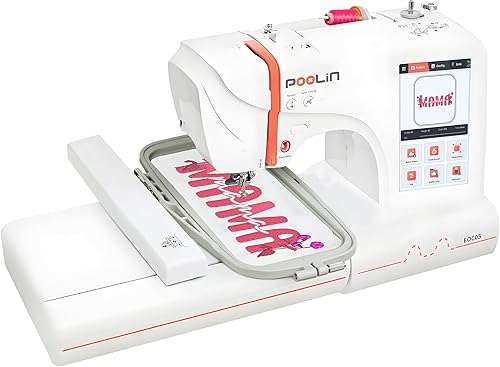
- 4 x 9.25 in embroidery field
- 7 in color touchscreen
- Institch OS2 software with free inStitch design software
- Wi-Fi and USB design transfer, works with Mac and iPad
- Two hoops: 4 x 9.25 in and 4 x 4 in
- 30 pieces of stabilizer and 6 rolls of thread in the box
A 4 x 9.25 inch embroidery only machine with a 7 inch touchscreen and a starter kit. Poolin says it suits personal projects like clothing, accessories, home decor and gifts.
Pros
- Long 4 x 9.25 in field for names and borders
- Two hoops and a starter kit in the box
- 7 in touchscreen, nearly twice the size of Brother's 3.7 in screens
Cons
- At 22 lb, it is heavier to move than the Brother PE545
- Poolin says it is for personal projects, not commercial mass production
| Spec | Poolin EOC05 |
|---|---|
| Embroidery field | 4 x 9.25 in |
| Screen | 7 in color touchscreen |
| Software | Institch OS2 and free inStitch design software |
| Design transfer | Wi-Fi and USB |
| Hoops in the box | 4 x 9.25 in and 4 x 4 in |
| Weight | 22 lb |
| Size | 21.5 in wide, 10.8 in deep, 8.7 in high |
| Power | Corded electric |
What is the Poolin EOC05 built for?
It is built for beginners and home users who want to stitch personal projects, Poolin says. Poolin names clothing, accessories, home decor and handmade gifts.
It does not sew, so it is a dedicated embroidery machine. Poolin also says it is not intended for commercial mass production.
Poolin describes the EOC05 as a machine to start simple on and grow your skills over time. That fits a beginner who wants to learn at a steady pace.
Embroidery field: what 9.25 inches gives you
The 4 x 9.25 inch field is long rather than square, so it suits designs that run in one direction. Its long side is more than twice the 4 inch side of a 4 x 4 machine.
Name bands, borders and wide motifs fit a long field more easily than a square one. Poolin says the field gives comfortable room for shirts, hoodies, bags and gifts.
The field sets the largest design you can stitch, so measure your design before you buy. A design that is too big has to be split or resized, which takes more time than measuring first.
The two hoops that come with the Poolin EOC05 embroidery machine
The box includes a 4 x 9.25 inch hoop and a 4 x 4 inch hoop. The small hoop lets you stitch a monogram or a pocket motif without setting up the long frame.
Pick the hoop first, then size your design to fit it. The long hoop also needs room to travel, so keep the area around the machine clear.
Screen and controls
The 7 inch color touchscreen is almost twice the size of the 3.7 inch screen on Brother's PE545, PE900 and SE700. Poolin says the screen gives clear guidance and simple navigation, which makes operation easier for beginners.
A bigger screen makes it easier to read menus and check a design before you stitch. Poolin says Institch OS2 is designed for intuitive operation and smooth learning.
Design transfer and software
The EOC05 takes designs over Wi-Fi or USB and comes with free inStitch design software. Those are the two transfer routes Poolin names.
Poolin says you log in to the Institch website to manage your Poolin devices and turn on Wi-Fi transfer. It also says the software works with Mac and iPad, and can import widely used design files.
The design software is meant for creating and editing designs for gifts and personal projects, and Poolin says it includes doodle embroidery and pattern storage. Poolin doesn't name Windows, so ask first if a Windows PC is your main computer.
Use designs you have the right to stitch, whether you draw them, buy them or download them.
What is in the box
The box covers the basics for a first project, though you still need your own fabric. It includes:
- Two hoops: 4 x 9.25 in and 4 x 4 in
- 30 pieces of stabilizer
- 6 rolls of thread and 25 prewound bobbins
- 9 needles, a thread stand, a USB drive and a tool kit
- An instruction manual and an operation guide
Poolin sells the EOC05 in bundles that differ in stabilizer, thread and bobbin counts, so check what your bundle includes before you order. If you are not sure which stabilizer to use, read Do You Need Stabilizer for Embroidery? before your first project.
Poolin doesn't state a built-in design count for the EOC05, so ask first if you want ready-made designs out of the box.
A good first project on the EOC05
A small motif in the 4 x 4 hoop is a sensible first project, and a name band suits the 4 x 9.25 inch hoop better. Start small so you learn the hooping, the stabilizer and the thread before you stitch on a finished item.
Keep scrap fabric nearby for test runs. Stitch the design on scrap first, then move to the real piece once the result looks right.
Poolin describes its software as one platform for editing, managing and transferring designs across devices. Learn that workflow on a simple design, then use it on longer projects.
Setup, learning curve and help
Poolin points buyers to several ways to reach its team, a user group and tutorial videos on YouTube. It also advertises personalized one-on-one training, and the box includes details on how to find Poolin's team.
Start with the tutorials, then reach out with questions. Keep your fingers clear of the needle while the machine runs, and unplug it before you change a needle.
Size, weight and power
The EOC05 weighs 22 pounds, so plan the move before the box arrives. It measures 21.5 inches wide, 10.8 inches deep and 8.7 inches high.
It is corded electric, so put the machine on a sturdy table close to an outlet. Make sure the table is wide enough for the machine before you set it up.
Who the Poolin EOC05 suits
The EOC05 suits a beginner who wants a long field, a bigger screen and a starter kit for personal projects. It is also a good fit for a home user who likes having two hoop sizes ready.
- Someone making name bands, borders and wide motifs for clothing and bags
- A first-time user who wants a larger screen to read designs and menus
- A home user who wants two hoops and starter supplies in one box
- A gift maker doing personal, non-commercial work
Who should skip the Poolin EOC05
Skip the EOC05 if you need to sew, need a light machine or plan commercial mass production. Each of those needs points to a different kind of machine.
It is embroidery only, so you would need a separate sewing machine for hemming and repairs. Poolin doesn't state a warranty term for the EOC05, so ask Poolin about it before you buy.
How the EOC05 compares with Brother machines
Next to Brother's PE545 and PE900, the EOC05 has the longest field and the biggest screen, but it doesn't state a built-in design count. The table sets the main numbers side by side.
| Spec | Poolin EOC05 | Brother PE545 | Brother PE900 |
|---|---|---|---|
| Embroidery field | 4 x 9.25 in | 4 x 4 in | 5 x 7 in |
| Screen | 7 in | 3.7 in | 3.7 in |
| Weight | 22 lb | 14.1 lb | 21 lb |
| Built-in designs | Not stated | 135 | 193 |
| Hoops in the box | Two | One 4 x 4 in | One 5 x 7 in |
Alternatives to the Poolin EOC05
The Brother PE545 is the closest alternative, with a smaller 4 x 4 inch field and a lighter 14.1 pound body. Read the Poolin vs Brother embroidery machine comparison to see the two side by side.
If you want a Brother with a larger field, the Brother PE900 review covers its 5 x 7 inch embroidery area. Check Brother's US site for current details on both models.
If you need more than personal projects, the home business machine roundup covers machines with bigger fields and more needles. Poolin says the EOC05 is not intended for commercial mass production.
If you are choosing between Brother's 4 x 4 combo and its 5 x 7 embroidery machine, the Brother SE700 vs PE900 comparison helps. For a shortlist at this budget, see the best beginner embroidery machines roundup.
New to the hobby? Our beginner machine guide explains what to check before you choose any machine.
Verdict on the Poolin EOC05 embroidery machine
The Poolin EOC05 is a good pick if you want a long field, a 7 inch screen and a starter kit. It is a weaker pick if you need a light machine or a sewing function.
Pick the EOC05 if long names, borders or wide motifs are your main work. Pick it too if a larger touchscreen and two hoops matter more to you than weight.
Pick a different machine if you need to sew, or if a 4 x 4 field is enough and you want a lighter body. Measure your largest design and your table before you order, since those two measurements decide this purchase more than any feature.
Frequently asked questions
Is the Poolin EOC05 a sewing machine too?
No, the EOC05 is embroidery only and does not work as a sewing machine, Poolin says. If you need one machine that sews and embroiders, a combo is the better fit, and our Brother SE700 review covers one of those options.
How big is the Poolin EOC05 embroidery area?
The EOC05 has a 4 x 9.25 inch embroidery area, and it comes with a 4 x 9.25 inch hoop and a 4 x 4 inch hoop. Measure your largest design in inches before you order, since the embroidery area sets the biggest design you can stitch in one hoop.
Does the Poolin EOC05 work with a Windows computer?
Poolin says its software works with Mac and iPad and does not mention Windows. Designs move to the machine over Wi-Fi or USB, so ask Poolin about Windows support before you buy if a Windows PC is the computer you plan to use.
How heavy is the Poolin EOC05 to move?
The EOC05 weighs 22 pounds and measures 21.5 inches wide, 10.8 inches deep and 8.7 inches high. It is corded electric, so plan a table with an outlet nearby, and ask a second person to help if you will move it up stairs.


